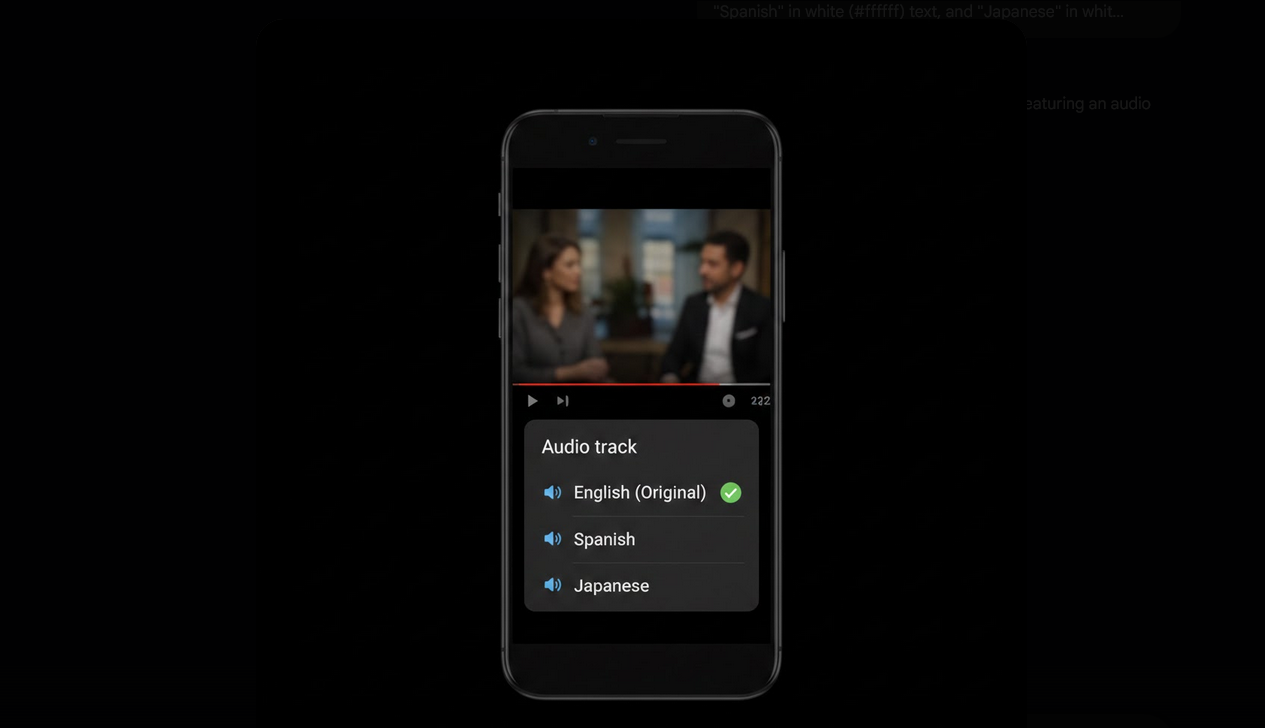
YouTube now supports multiple audio tracks on a single video, allowing creators to upload their content with audio in several languages. Viewers can switch between languages directly from the player without needing to find a separate dubbed version of the video. It is a significant step toward making YouTube content accessible to global audiences in their preferred language.
How Multi-Language Audio Works
When a creator uploads additional audio tracks to a video, YouTube adds an audio track selector to the player settings. Viewers can open this selector and choose their preferred language. The video visuals remain the same while the audio switches to the selected language. It works similarly to how streaming platforms like Netflix handle dubbed audio for their shows and movies.
How to Switch Audio Tracks
- Open the Video: Start playing a video that has multiple audio tracks available.
- Tap the Gear Icon: Open the settings menu in the video player.
- Select Audio Track: Look for the Audio Track option in the settings menu. If it appears, the video has multiple languages available.
- Choose Your Language: Select your preferred language from the available options.
- Audio Switches Instantly: The video continues playing seamlessly with the new audio track applied.
How to Know if a Video Has Multiple Audio Tracks
Not all videos support multi-language audio. The feature depends entirely on whether the creator has uploaded additional tracks. You can check by opening the player settings and looking for the Audio Track option. If the option is not present, the video only has its original audio. Over time, more creators are adopting this feature, especially channels with large international audiences.
Multi-Language Audio vs Subtitles
- Audio Tracks: Full dubbed audio in another language. The viewer hears the content spoken in their preferred language.
- Subtitles: Text overlay translating the original audio. The viewer reads the translation while hearing the original language.
- Auto-Translate Subtitles: Machine-translated captions that are less accurate than human translations but available for most languages.
- Best Experience: Multi-language audio provides the most natural viewing experience for non-native speakers since they can listen rather than read.
Multi-Language Audio on YouTube Vanced
YouTube Vanced supports multi-language audio track selection with the same functionality as the official app. You can switch between available languages through the player settings seamlessly. The ad-free experience ensures that switching audio tracks never triggers an ad break, which can happen on the official app when player settings are changed mid-video.
Combined with subtitle customization, Vanced provides the most flexible multilingual viewing experience available on Android. With Vanced MicroG for account sync, your language preferences and settings stay consistent.
Benefits of Multi-Language Audio
- Natural Viewing: Listening in your native language is more comfortable and less tiring than reading subtitles.
- Accessibility: Viewers who cannot read subtitles quickly benefit greatly from dubbed audio.
- Global Reach: Creators can reach international audiences without requiring viewers to understand the original language.
- Language Learning: Switch between the original and dubbed audio to practice comprehension in different languages.
- Multitasking: Dubbed audio lets you listen to content in your language without needing to watch the screen for subtitles.
For Creators Adding Multi-Language Audio
- Upload Through YouTube Studio: Go to video details, select Audio, and upload additional language tracks.
- Quality Matters: Professional dubbing sounds better than AI-generated voice tracks and improves viewer retention.
- Label Correctly: Ensure each track is labeled with the correct language for easy identification by viewers.
- Cover Major Languages: Prioritize languages where your analytics show the highest non-native viewership.
Who Benefits from Multi-Language Audio
- Non-Native Speakers: Viewers who prefer consuming content in their native language rather than reading subtitles.
- Global Audiences: International viewers of channels that produce content in a language they do not speak.
- Language Learners: Students who switch between languages to practice listening comprehension.
- Content Creators: YouTubers who want to expand their reach to multilingual audiences worldwide.
Final Thoughts
Multi-language audio tracks make YouTube more accessible and enjoyable for a global audience. Being able to switch audio languages directly from the player is a game-changing convenience that eliminates the need to search for separately uploaded dubbed versions. Using YouTube Vanced ensures the experience stays smooth and ad-free, letting you focus on the content in whatever language suits you best.
